Truly fine
Documentation.
How to set up the secondary menu (Browse by category)
Last update:
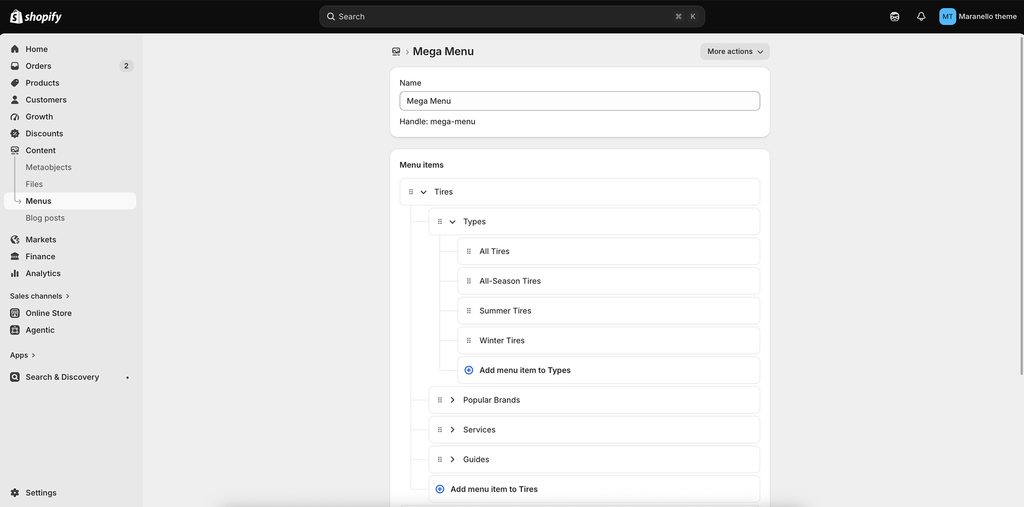
Maranello’s secondary menu is designed to display mega menu-style navigation and make it easier for customers to browse product categories. To take advantage of this feature, create a nested navigation menu for your product categories with two levels of nested menu items.
For example: Your secondary menu can include Tires, Wheels, Batteries, and Parts & Accessories as top-level menu items. Under Tires, you can add second-level items such as Types, Popular Brands, Services, and Guides. Each second-level menu item can contain links to corresponding product collection. The top-level and second-level menu items help organize the menu and don’t need to link to a specific page.
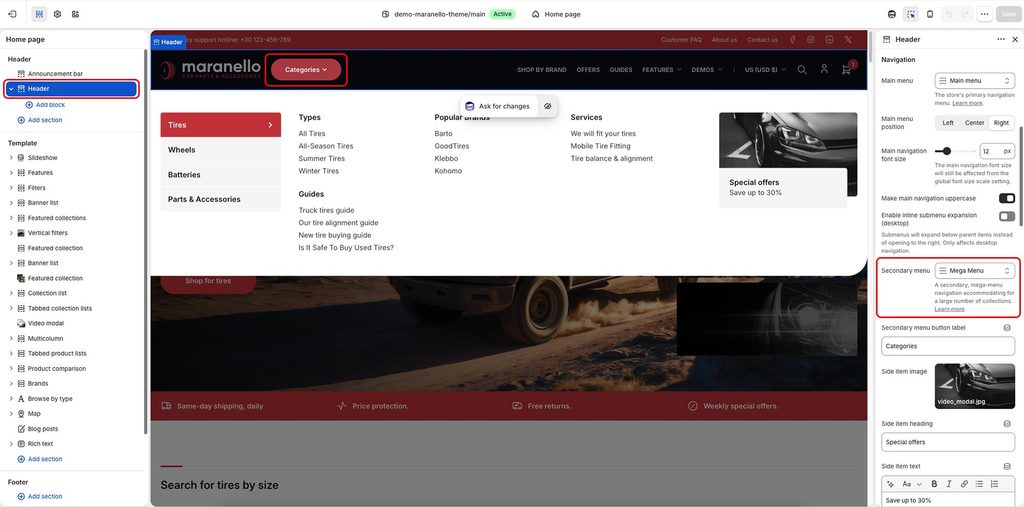
Once the secondary menu is created, navigate to Online Store in your Shopify admin, select the Maranello theme, and click Edit theme.
In the theme editor, select the Header section and scroll down to the Navigation settings. Under Secondary menu, select the menu you want to use as your online store’s secondary menu.
Can't find what you are looking for? Feel free to submit a request.