Truly fine
Documentation.
Contact page
Last update:
The contact page is essential for any online store as it provides your existing and potential customers with ways to contact you regarding presales questions, after sales support or general inquiries.
Using the template
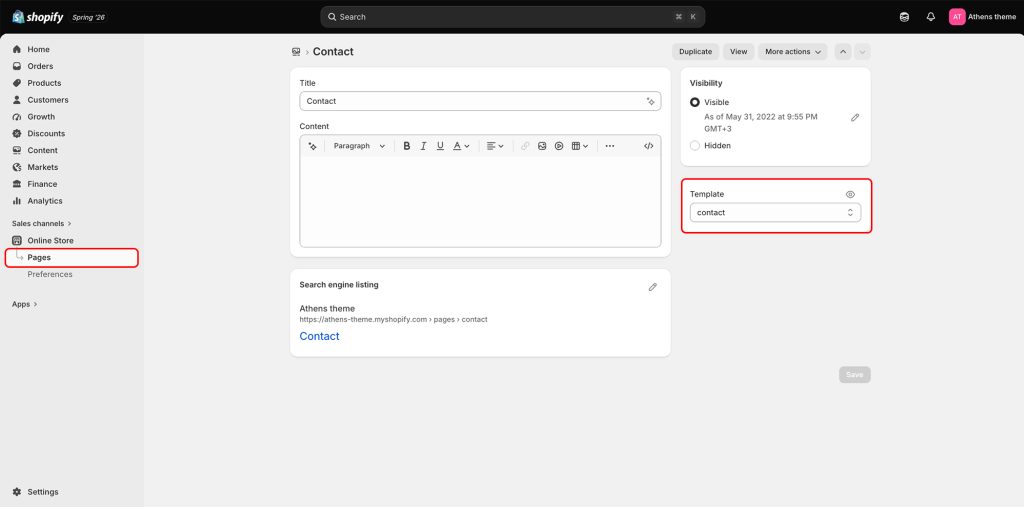
To utilize the Contact page template create a new page and apply to it the contact template from the Theme template drop down on the right hand side of the screen. Create a page from the Pages menu under the Online Store sales channel in your Shopify Admin. During page creation use the Content box to add any textual content you’d like to display on your contact page such as phone numbers, out of hours contact methods and more.
Template contents
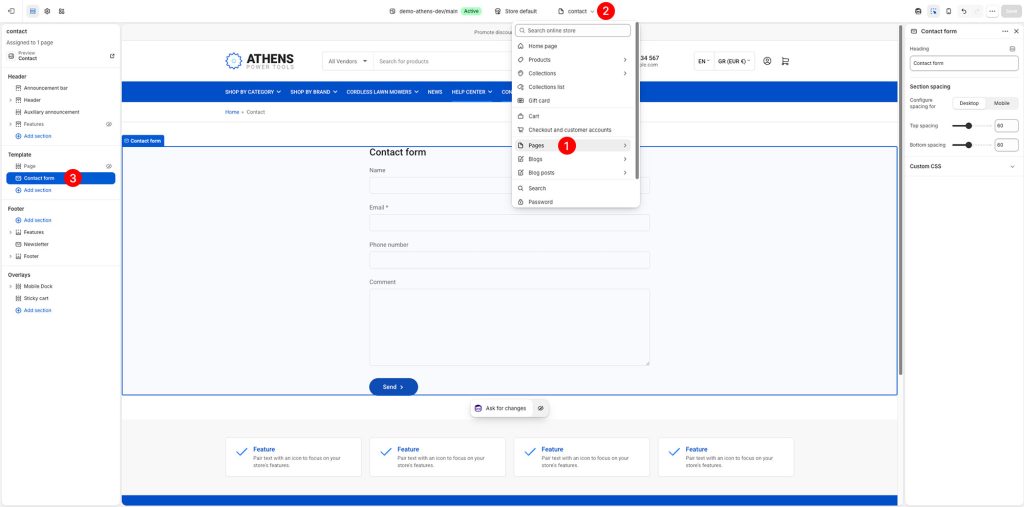
The template consists of two sections:
Page section
The page section will pull in any content added to the page during the page creation procedure.
Contact form
This section will display your contact form on the page below the page’s content. You can customize the form’s heading if you wish.
Section spacing
The section spacing settings give you the option to adjust the top & bottom section spacing values. Use the Configure spacing for option to switch between the Desktop and Mobile values, each of which has its own Top spacing and Bottom spacing setting. Please note: If you select a color scheme with a background color, these settings will affect the spacing between the top or bottom of the section and the content of the section.
Can't find what you are looking for? Feel free to submit a request.