Truly fine
Documentation.
Currency and prices
Last update:
Theme Settings > Currency and Prices
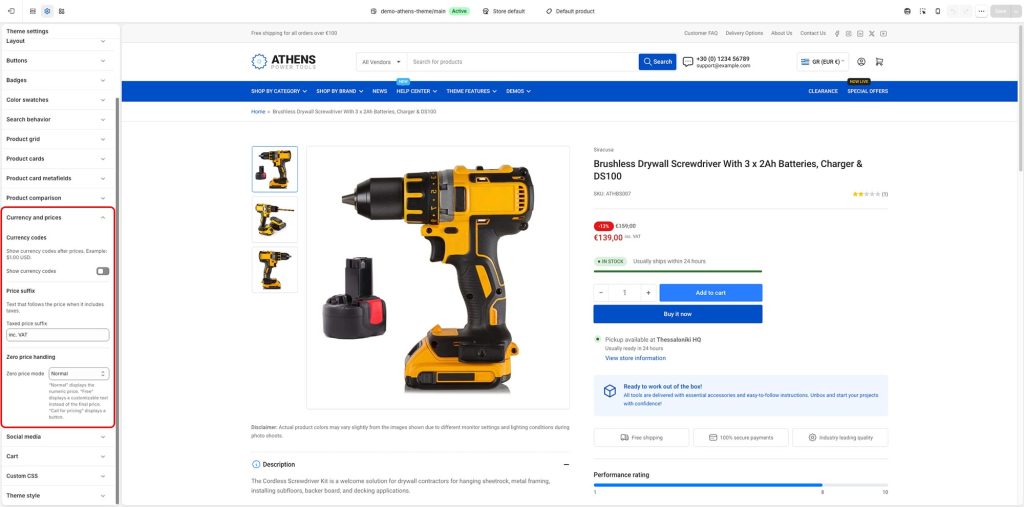
Currency codes: This setting is useful if you want to display not only the currency symbol but also a currency code. (For example stores that have Australian dollars AUD instead of American dollars USD set as their main currency).
Price suffix: Custom text that will appear after the product price. In our demo we use it to show that products include VAT (Tax collected in Europe) but it can be anything you like.
Zero price mode: Allows you to change how products with zero price are handled:
- Normal: Products show the price as usual, e.g. $0.00 or €0,00
- Free: The text “Free” is shown instead of the price. You can customize this text using the following Free text setting.
- Call for pricing: The price, along with the Add to cart button (if enabled), are hidden completely. A button with the text “Call for pricing” appears instead. You can customize the text and link using the following Call for pricing text and Call for pricing link settings. The link can be any valid URL, such as your contact page’s URL, or a callable number by prefixing it with “tel:”, e.g. “tel:+1234567890“
Can't find what you are looking for? Feel free to submit a request.