Truly fine
Documentation.
Link index section
Last update:
This feature was introduced in version 5.2.0The Link index section allows you to build lists of plain text links in a variety of layouts. There are two pre-configured section presets, Link index: Rows and Link index: Columns, which you can use as your starting point and can then customize according to your needs.
The section is composed of one or more Link Group blocks. Each Link Group block contains one or more Link blocks.
Section settings
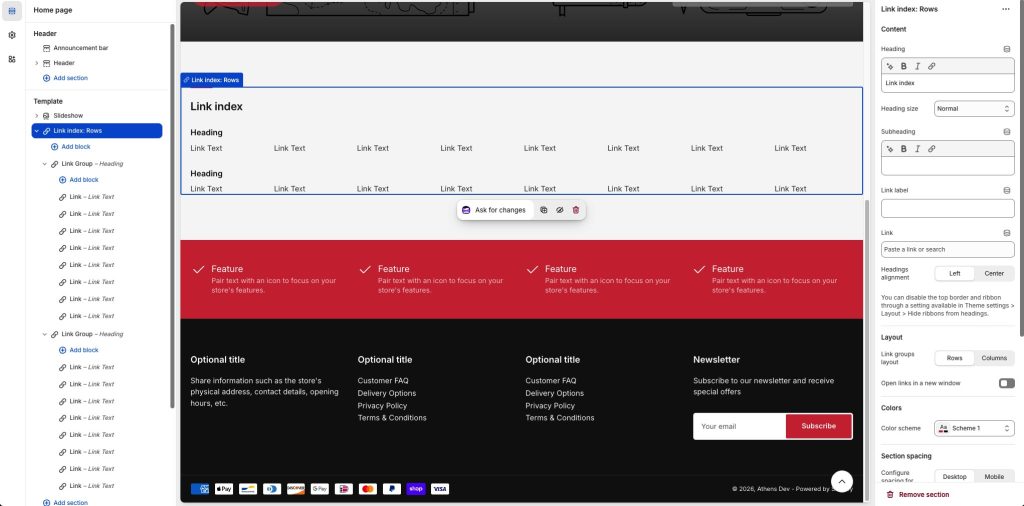
Heading: Set a title for this section. This is optional.
Heading size: Adjust the size of your heading to make your message stand out. Available options: Small, Normal, Large, Extra large, and Extra extra large.
Subheading: Set a subtitle for this section. Also optional.
Link label + Link: With these settings you can create a button that will appear at the top right corner of your collection list section. For example if you have used this section to showcase a list of offers, you can add a button with a link to a collection or page called “Offers”.
Headings alignment: Align the heading and subheading Left or Center.
Layout
Link groups layout: Set the layout of the Link Group blocks to either Rows or Columns. This only affects how the Link Group blocks are laid out, not the links inside each one.
Open links in a new window: When enabled, links will open in a new windows/tab.
Colors
Color scheme: Select one of the predefined color schemes as defined in Theme settings > Colors. For more information regarding the color schemes please refer to our article about creating your own color scheme.
Section spacing
The section spacing settings gives you the option to adjust the top & bottom section spacing values. Please note: If you select a color scheme with a background color, these settings will affect the spacing between the top or bottom of the section and the content of the section.
SEO
Heading tag: Select the appropriate heading level (H1, H2, or H3) based on how you want the section title to appear.
Visibility
Show section on desktop: Enable or disable the section’s visibility on desktop devices.
Show section on mobile: Enable or disable the section’s visibility on mobile devices.
Link Group block
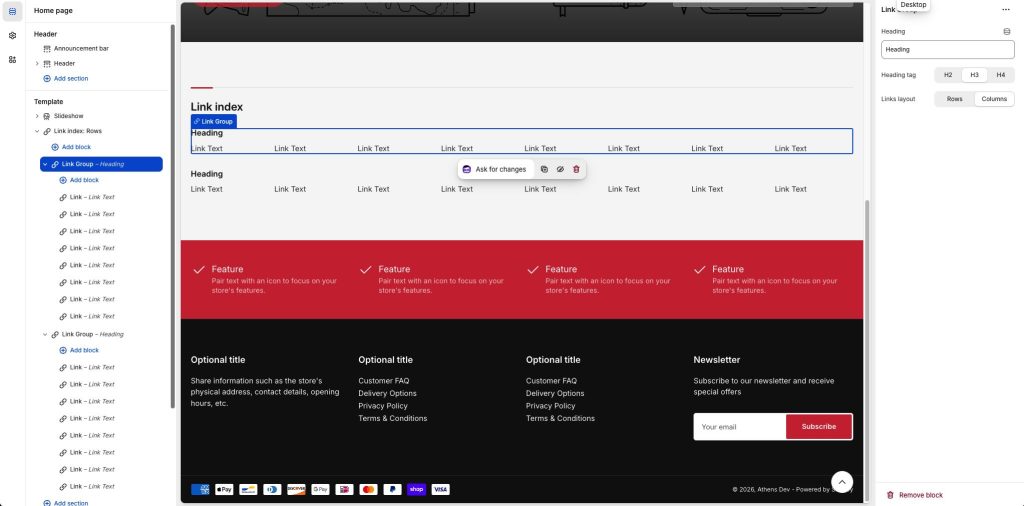
Heading: Set a title for this block. This is optional.
Heading tag: Select the appropriate heading level (H1, H2, or H3) based on how you want the block title to appear.
Links layout: Set the layout of the Link blocks to either Rows or Columns. This only affects how the Link blocks of this particular Link Group are laid out.
Can't find what you are looking for? Feel free to submit a request.