Truly fine
Documentation.
Bulk order section
Last update:
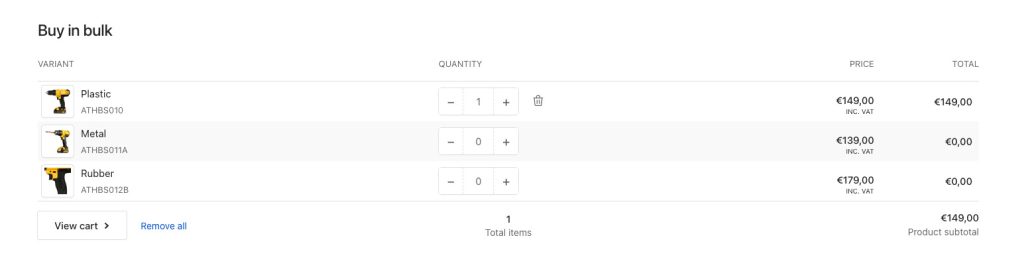
This section was introduced in version 5.0.0The bulk order section, commonly used in B2B stores, lists all the variants of the currently viewed product, allowing your customers to quickly add the variants they need into their cart. It is only available in product templates.
Section settings
Heading: Set a title for this section. This is optional.
Heading size: Adjust the size of your heading to make your message stand out. Available options: Small, Normal, Large, Extra large, and Extra extra large.
Subheading: Set a subtitle for this section. Also optional.
Headings alignment: Align the heading and subheading Left or Center.
Minimum variants: The minimum number of variants that the product should have in order to show the section. Set this to 1 to make the section always visible.
Pagination: When enabled, variants will be paginated according to the Variants per page setting. When disabled, all variants will be displayed on a single page (up to a maximum of 250 due to Shopify’s limits).
Variants per page: The amount of variants on each page. Only applies when Pagination is enabled.
Show variant images: Show/hide the variants’ images.
Colors
Color scheme: Select one of the predefined color schemes as defined in Theme settings > Colors. For more information regarding the color schemes please refer to our article about creating your own color scheme.
Section spacing
The section spacing settings gives you the option to adjust the top & bottom section spacing values. Please note: If you select a color scheme with a background color, these settings will affect the spacing between the top or bottom of the section and the content of the section.
SEO
Heading tag: Select the appropriate heading level (H1, H2, or H3) based on how you want the section title to appear.
Visibility
Show section on desktop: Enable or disable the section’s visibility on desktop devices.
Show section on mobile: Enable or disable the section’s visibility on mobile devices.
Can't find what you are looking for? Feel free to submit a request.