Truly fine
Documentation.
Sticky cart section
Last update:
This section was introduced in version 5.3.0The sticky cart section allows you to display a sticky Add to cart button (or its derivatives) so that your customers can add the product to their cart, even if they scroll past the product’s normal Add to cart button. It is only available in product templates, and can be found in the Overlays section group.
Section settings
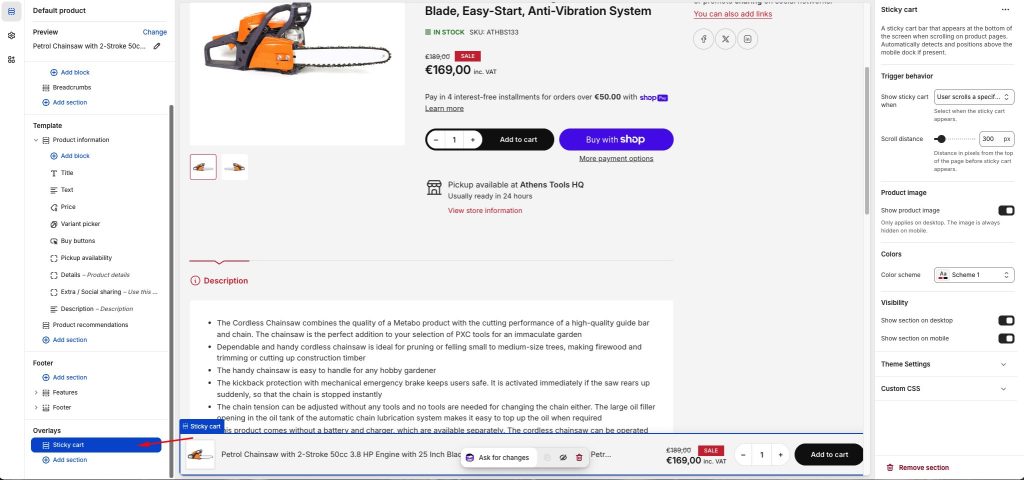
Trigger behavior
Show sticky cart when: Allows you to change when the sticky cart bar appears. User scrolls past “Add to cart” button has the sticky cart appear when the normal Add to cart button is out of view. User scrolls a specific distance displays the sticky cart after the page is scrolled past a pre-configured distance from the top of the page.
Scroll distance: Distance in pixels from the top of the page before sticky cart appears. Only applies when Show sticky cart when is set to User scrolls a specific distance.
Product image
Show product image: Allows you to show or hide the product’s image in the sticky cart. Only applies on desktop. The image is always hidden on mobile.
Colors
Color scheme: Select one of the predefined color schemes as defined in Theme settings > Colors. For more information regarding the color schemes please refer to our article about creating your own color scheme.
Visibility
Show section on desktop: Enable or disable the section’s visibility on desktop devices.
Show section on mobile: Enable or disable the section’s visibility on mobile devices.
Can't find what you are looking for? Feel free to submit a request.