Truly fine
Documentation.
Color scheme settings
Last update:
Introduced in Tokyo 4.0. If you are using a version earlier than Tokyo 4.0 please refer to this guide.The color system of Tokyo is centralized and available through the theme settings panel. The system is centered around Shopify’s color schemes feature, and is complemented by a set of extra color settings that target specific elements.
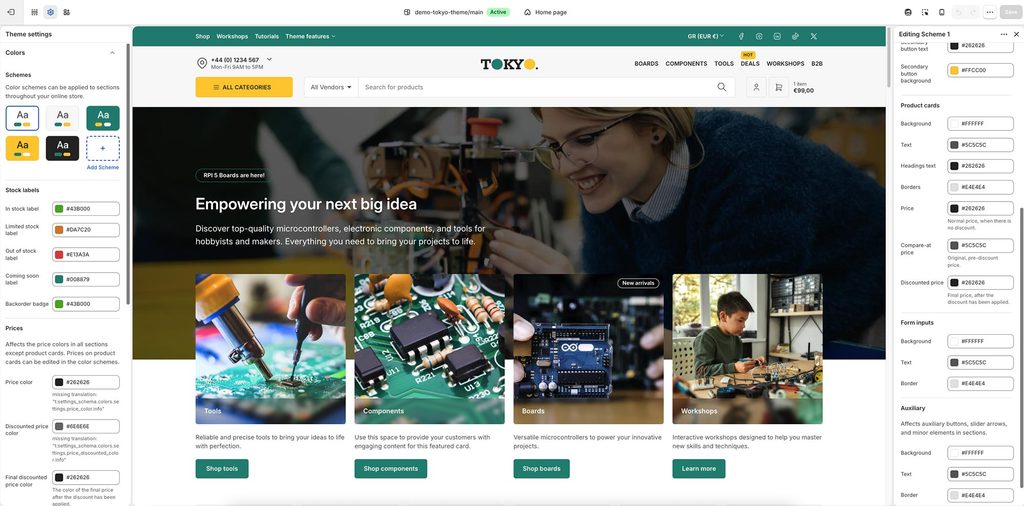
Color schemes
Color schemes are named bundles of color settings and their associated values. The theme provides 5 predefined color schemes which you can use as-is, or modify them to match your brand or design colors. You can also create new ones, up to a maximum of 21 color schemes in total.
Templates (product, page, collection, etc) and sections that don’t provide a dedicated color scheme picker setting, inherit their colors from Scheme 1.
Each color scheme is made up by a few generic and a few more specific color settings, providing flexible color combinations while trying to keep the number of options to a minimum. Each color scheme’s colors are divided in 5 main groups:
Primary colors
Background: The main background color, used throughout the section/element.
Primary text: Mostly used for textual elements like paragraph text.
Headings text: Used for headings and other equally important elements.
Borders and lines: Pretty much self-explanatory. Any lines (like the announcement bar border) or component borders (like the product card) will inherit their border color from this setting.
Accent 1: Used for accented elements like links, lower priority headings, etc.
Accent 2: Used for decorative elements like icons, bubbles, etc.
Buttons
Buttons in Tokyo have their own distinct color settings: “Primary Buttons” and “Secondary Buttons.” The vast majority of buttons in the theme are “Primary,” meaning they inherit the background and text colors defined in the “Primary Buttons” settings. “Secondary Buttons,” such as the “Add to cart” button on the product page, are used when visual separation is needed between buttons placed close to each other.
Product cards
These settings affect the colors of product cards, in sections that display them.
Background: The card’s background color.
Text: Mostly used for textual elements like the vendor’s name.
Headings text: Used for headings, such as the product title, and other equally important elements.
Borders:Any lines (like the card’s border) will inherit their color from this setting.
Price: Affects normal prices, that don’t have a discount applied.
Compare-at price: Affects the original, pre-discount price.
Discounted price: Affects the final, post-discount price.
Form inputs
These settings affect form elements, such as text and quantity inputs, and textareas.
Background: The background color of the form elements.
Text: The text/foreground color of the form elements.
Border: The border color of the form elements.
Auxiliary
These colors affect auxiliary elements, such as tertiaty buttons, slider arrows, tabs, etc. Similar to the other groups, you can set the background, text, and border colors.
Extra color settings
Stock labels
In stock label: Background color of the availability label, when the product is considered in stock.
Limited stock label: Background color of the availability label, when the product is considered to have limited stock.
Out of stock label: Background color of the availability label, when the product is considered out of stock.
Coming soon label: Background color of the availability label, when the product has the pre-order template assigned.
Backorder badge: Background color of the availability badge, when the product is considered on backorder.
Prices
These settings affect product prices everywhere (e.g. on the product display page), except from product cards.
Price color: Affects normal prices, that don’t have a discount applied.
Discounted price color: Affects discounted prices.
Final discounted price color: Affects the final price after the discount has been applied.
Can't find what you are looking for? Feel free to submit a request.